
To access It Ain’t Over Ministries Virtual Zoom Meetings by telephone, find the meeting below that you would like to attend. On your telephone, dial the phone number shown below in the meeting telephone numbers listings. We recommend that you start with the first number on the list (usually the “New York” number) as the first number on the list has been shown to be the most reliable in establishing a connection to the meetings.
When Zoom’s automated answering service answers the telephone call, it will ask you to enter the “Meeting ID” of the meeting you wish to attend. This is located in the following lists directly under the Name of the meeting, highlighted in Yellow.
When prompted, enter the Meeting ID and press the pound (#) key.
The system will then ask you to enter your “Participant ID” or just to continue to press the pound (#) key. At this point, just press the pound (#) key to continue. *
The system will now ring the meeting you’re joining and alert the Host of the meeting that you are in the “Waiting Room”, and we’ll promptly let you into the meeting.
Great to see you again!
*NOTE: – We have not and are not planning on assigning anyone a “Participant ID”, so when you get to that point during the call-in to the meeting in the instructions above, you can simply just press the pound (#) key to proceed to the meeting.
**NOTE: – None of our Virtual Meetings have any type of password, passcode, or other forms of security appended to them in the meetings settings, so if you call in to the meetings using the numbers below and are asked for these things, then you have dialed into the wrong meeting and you need to hang up and try again.
Some things to note about calling into the It Ain’t Over Virtual Zoom Meetings via the telephone option.
1. Since you are using your telephone to access the Virtual Meetings you will not have any access to video, meaning if there is a presentation being made for all to see, you won’t be able to see it.
2. Since you are using your telephone to access the Virtual Zoom Meetings, your video camera will not work so nobody will be able to see you nor will you be able to see anyone else during the meeting.
3. You will not have any other available option during the meetings, other than to mute yourself on your own device. If you mute yourself on your device via your telephone app keypad UI (User Interface), nobody in the meeting will be able to see that you are muted.
4. If you get muted by the meeting Host or a Co-Host, the Zoom system will notify you aloud by saying, “You are muted”. You can unmute yourself by pressing *6 (star/asterisk 6). When you press *6, the system will notify you that you are unmuted by saying, “You are unmuted”.
5. During the meeting, other participants who have joined via the internet video link will see your “Profile Box” in the meeting video window as it appears below.

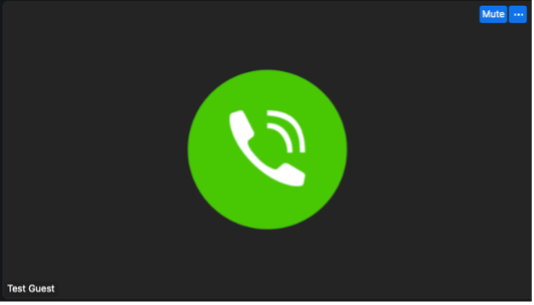
The image on the left is when a telephone guest is NOT speaking, and the image on the right is what everyone else in the meeting sees when the guest IS speaking.
The image on the top is when a telephone guest is NOT speaking, and the image on the bottom is what everyone else in the meeting sees when the guest IS speaking.
6. When you enter the meeting from the waiting room, your telephone number that you are calling from is displayed in the lower left corner of your “Profile Box”. Once you are admitted access to the meeting either the Host or a Co-Host will politely welcome you to the meeting and then immediately ask you your name. When giving your name, please be honest and use your real name that people call you by in everyday life. The Host or a Co-Host will then change your name as it is displayed by default in the lower left corner of your “Profile Box”. This will serve a two-fold purpose; one, it will allow everyone else in the meeting to know who you are so that if they wish to address (speak) to you during the meeting they will be able to address (speak) to you using your real name; and two, this will allow your telephone number to be hidden from view so that no one else in the meeting can get your phone number.
We would love to see you join our weekly Virtual Fellowship Meetings on Tuesday and Friday evenings, and our weekly Virtual Prayer Rally on Wednesday evening. Whether you choose to join via the internet link through your preferred web browser, the official Zoom app, or by telephone, you are welcome and your presence in our meetings is more special to us than you’ll ever know.
If you have any further questions about It Ain’t Over Ministries, our Community, our Virtual Meetings, or if you need help with anything, we are always a simple email or DM away. Feel free to reach out to us any time at: [email protected] or text us at: (706) 413-9462. We look forward to seeing you in both our awesome online Community and in our virtual meetings.
Tuesday Evening Fellowship Meeting:
Meeting ID: 899 6356 7660
Dial by your location
• +1 646 558 8656 US (New York)
• +1 646 931 3860 US
• +1 301 715 8592 US (Washington DC)
• +1 305 224 1968 US
• +1 309 205 3325 US
• +1 312 626 6799 US (Chicago)
• +1 253 215 8782 US (Tacoma)
• +1 346 248 7799 US (Houston)
• +1 360 209 5623 US
• +1 386 347 5053 US
• +1 507 473 4847 US
• +1 564 217 2000 US
• +1 669 444 9171 US
• +1 689 278 1000 US
• +1 719 359 4580 US
• +1 720 707 2699 US (Denver)
• +1 253 205 0468 US
Wednesday Virtual Prayer Rally:
Meeting ID: 896 1696 3825
Dial by your location
• +1 312 626 6799 US (Chicago)
• +1 646 558 8656 US (New York)
• +1 646 931 3860 US
• +1 301 715 8592 US (Washington DC)
• +1 305 224 1968 US
• +1 309 205 3325 US
• +1 669 444 9171 US
• +1 689 278 1000 US
• +1 719 359 4580 US
• +1 720 707 2699 US (Denver)
• +1 253 205 0468 US
• +1 253 215 8782 US (Tacoma)
• +1 346 248 7799 US (Houston)
• +1 360 209 5623 US
• +1 386 347 5053 US
• +1 507 473 4847 US
• +1 564 217 2000 US
Friday Upper Room Bible Study Meeting:
Meeting ID: 819 0983 9546
Dial by your location
• +1 646 558 8656 US (New York)
• +1 646 931 3860 US
• +1 301 715 8592 US (Washington DC)
• +1 305 224 1968 US
• +1 309 205 3325 US
• +1 312 626 6799 US (Chicago)
• +1 386 347 5053 US
• +1 507 473 4847 US
• +1 564 217 2000 US
• +1 669 444 9171 US
• +1 689 278 1000 US
• +1 719 359 4580 US
• +1 720 707 2699 US (Denver)
• +1 253 205 0468 US
• +1 253 215 8782 US (Tacoma)
• +1 346 248 7799 US (Houston)
• +1 360 209 5623 US